
Ultimate Guitar: Chords & Tabs
Ultimate Guitar USA LLCMusic & Audio
4.270.52K Reviews
- Version
- 7.3.38
- Installs
- 10.00M
- Age Rating
- Teen
Screenshots


Our Review of Ultimate Guitar: Chords & Tabs
 Analysis by Appyee
Ever found yourself strumming a guitar, trying to figure out the chords to your favorite song? If you're anything like me, Ultimate Guitar: Chords & Tabs can be a useful place to start. I think of it less as a finished music-production workspace and more as a practical reference for getting a song into my hands: I can look up a part, work through it, and decide what I need to change in my own playing.
A quick route from an idea to a song
When a tune gets stuck in my head, I want to spend more time playing than searching. This is where the app’s broad focus helps: it covers tabs and chords for guitar, ukulele, bass, and other instruments, so I can look for a playable arrangement rather than relying on a lyric sheet or a chord chart made for someone else’s instrument. The developer is Ultimate Guitar USA LLC, and the app sits in the music and audio category.
It is free to install, with in-app purchases ranging from $0.99 to $109.99 per item. That makes it reasonable to try before deciding whether its paid options suit the way I practice. The app has a 4.3 average from around 616,000 ratings, and more than 10 million installs. Those figures suggest it has found a substantial audience, but they don’t tell me whether a particular arrangement is accurate; I still treat each tab as a version to check by ear.
Choosing a useful arrangement
One practical habit is to compare a chord-focused version with a tab when both are available. A chord chart is usually the quicker choice if I want to sing along or accompany someone, while a tab can be more helpful when a recognizable riff or picked passage carries the song. The trade-off is that a detailed tab can slow down a beginner who only needs the harmony. I start with the simplest arrangement that gets the song moving, then add detail if I can hear that something important is missing.
That approach also helps when the first result doesn’t fit my instrument or skill level. A song title alone doesn’t guarantee a useful match: I check the instrument, tuning, and playing style before investing time in a version. If the part seems unexpectedly awkward, I pause and compare the sound rather than assuming I need to practice harder. The best result is the one that works for my goal, not necessarily the most elaborate-looking transcription.
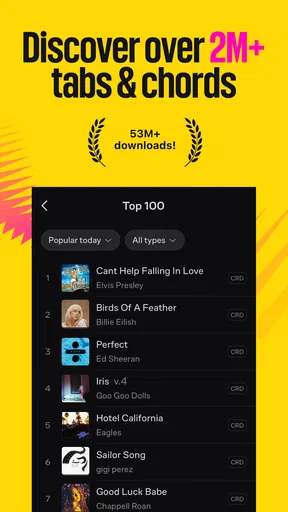
The app is aimed at players who want a sizable song reference close at hand. Ultimate Guitar says its library contains more than two million music tabs and chords, and that range is useful when I want to move between familiar songs and less obvious choices. Its content rating is Teen, so it is not positioned as a child-focused learning app. The current version is 7.2.8, and the app first appeared on October 13, 2010.
From first search to a playable arrangement
The home screen is neatly organized, with options to search for songs, explore new tabs, and even learn new skills. Whether you're a beginner or a seasoned player, there's something here for everyone. I find the search-first approach especially useful when I already have a song in mind; when I don’t, browsing can help me pick something to work on without having to build a practice plan from scratch.
A realistic use for me is a short practice session after work. I search for a song I know, open a version that matches my instrument, and play through the changes slowly before trying to keep time. If I’m practicing somewhere I may lose connectivity, downloading the tab ahead of time is a sensible step. That workflow turns the app into a handy reference, though I still need my instrument and my own judgement to shape the performance.
Features That Hit the Right Note
One of the standout features for me is the extensive library of over 1.4 million tabs. Yep, you heard that right! Whether you're into rock, pop, jazz, or something in between, this app's got your back. A large collection is most valuable when I use it selectively: I look for a version I can actually play, rather than treating the number of results as proof that every entry will be a perfect transcription.
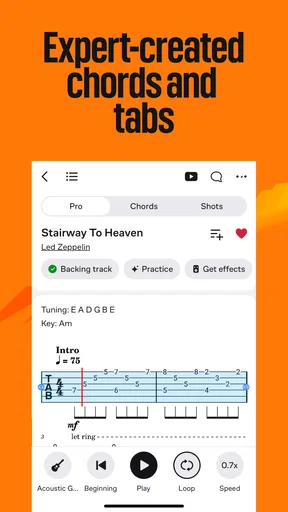
- Interactive Tabs: These aren't your average static tabs. You can actually hear how they sound, which is super helpful when you're learning a new song. I use that playback as a reference, then slow down and isolate the part that is giving me trouble instead of repeatedly attempting the whole song.
- Tuning Options: The app offers a built-in tuner, which is a lifesaver. No more fumbling around with a separate tuner app. Before following a tab, I check whether its tuning suits my instrument; otherwise, familiar fingerings can produce a different pitch from the recording.
- Autoscroll Feature: Ever tried to play and scroll at the same time? It's a nightmare. Thankfully, the autoscroll feature makes it a breeze. I treat it as a convenience rather than a metronome: if the scroll moves at a pace that doesn’t match my playing, I stop it and work through the tricky passage first.
Learning and Growing
For those looking to improve their skills, the app includes lessons and tips tailored to your level. Whether you're tackling basic chords or diving into advanced techniques, there's always something new to learn. I found the video tutorials particularly engaging, breaking down complex techniques into manageable steps. I’d use lessons alongside songs rather than expecting a song tab to teach technique on its own: a chord chart can show where to put my fingers, but it won’t automatically fix timing, clean transitions, or tension in my fretting hand.
Plus, the community aspect of the app is fantastic. You can connect with fellow musicians, share your own tabs, and even request songs. It's like having a supportive band of virtual friends right at your fingertips. For a player making an arrangement, sharing a tab can be a useful way to make the work available to others; it is still worth checking the result carefully before treating it as a polished, definitive version. The app is a reference and a place to engage with music-making, not a substitute for listening closely or rehearsing with other people.
Making the material fit your practice
For me, the most useful “editing” happens in how I work with a tab. I mark a mental boundary around the passage I’m learning, loop my attention over the difficult change, and then reconnect it to the rest of the song. When I’m planning a casual jam, I choose the simplest playable arrangement and make a note of any section that needs a different voicing. This keeps the app’s large library from turning into endless browsing.
There is a real trade-off between convenience and musical judgement. A tab can get me close to a part quickly, but a written arrangement may not capture every nuance of the recording, and different versions can make different choices. If exact note-for-note transcription is essential, I compare what I see with the recording and use a dedicated transcription or notation workflow when needed. If I only need the chords to accompany a singer, a concise chord reference may be faster than navigating a detailed tab.
Performance and Usability
So, how does the app perform? In a word: smoothly. Whether you're using it on a high-end smartphone or something more modest, Ultimate Guitar: Chords & Tabs runs without a hitch. The developers have clearly put a lot of thought into optimizing the app for different devices. In day-to-day use, I also think about the screen itself: a phone is convenient for looking up a passage, but a small display can make dense tabs less comfortable to follow for a long session.
One thing I particularly appreciate is the offline mode. You can download tabs and access them without an internet connection, which is perfect for those times when you're jamming in a Wi-Fi dead zone. I make a habit of saving the material I expect to use before leaving home, rather than assuming I’ll be able to search once I arrive. That is particularly handy for a rehearsal space, a commute, or a place where I want to keep my phone’s attention on the music instead of connectivity.
When another tool may suit you better
Compared with a basic chord website or a single-purpose tuner, this app brings more song material and practice references together. That breadth is the main reason I’d choose it when I want to explore several arrangements or switch between instruments. A focused tuner can be quicker if all I need is to tune up, while a metronome is a better choice when timing is the only problem. A notation program or audio editor makes more sense for producing and refining a finished recording; this app is strongest earlier in the process, when I’m learning, checking, and organizing playable parts.
I wouldn’t recommend relying on it as the only source for a student who needs a carefully sequenced, teacher-led course, or for a musician preparing a precise studio transcription. Beginners can still get value from it, but a huge catalogue can feel like too much choice unless they have a song or a specific skill to guide the search. Experienced players may appreciate the quick reference, yet should expect to verify arrangements and adapt them to their own instrument and performance.
Final Thoughts
In conclusion, Ultimate Guitar: Chords & Tabs is more than just an app; it's a comprehensive tool for any guitarist. With its vast library, interactive features, and supportive community, it's a must-have for musicians at any stage of their journey. I’d describe its real strength more narrowly: it helps me get from “I want to play that” to a workable starting point, while leaving the musical choices and final polish in my hands.
If you're ready to elevate your guitar playing, give this app a try. It's not just a practice tool; it's a gateway to a whole new world of musical possibilities. So grab your guitar, download the app, and let the music flow! I’d start with one familiar song, check that the arrangement and tuning make sense, and save it for the next practice. If that process feels useful, the breadth of the library may earn it a regular place in your routine; if you mainly need structured lessons, exact transcription, or dedicated recording tools, another focused option will serve you better.
Privacy and Permissions
See what permissions an app requests and how it handles your data.
- Phone
- read phone status and identity
- Photos/Media/Files
- read the contents of your USB storage
- Storage
- read the contents of your USB storage
- Camera
- take pictures and videos
- Microphone
- record audio
- Wi-Fi connection information
- view Wi-Fi connections
- Device ID & call information
- read phone status and identity
- Other
- view network connections, pair with Bluetooth devices, access Bluetooth settings, measure app storage space, full network access, draw over other apps, control vibration, prevent device from sleeping, install shortcuts, Google Play license check
Verdict
Strengths of Ultimate Guitar: Chords & Tabs
- Extensive library of tabs and chords.
- User-friendly interface for easy navigation.
- Supports multiple instruments, not just guitar.
- Offline access to saved favorites.
- Includes interactive lessons and tutorials.
Limitations of Ultimate Guitar: Chords & Tabs
- Some advanced features require a subscription.
- Occasional inaccuracies in user-uploaded tabs.
- Ads can be intrusive without premium.
- Limited free content compared to paid version.
- Interface can be cluttered for beginners.
Similar Picks in This Category
View All
YouTube Music
Google LLC4.4

Samsung Music
Samsung Electronics Co., Ltd.3.8

Spotify: Music and Podcasts
Spotify AB4.3

JioSaavn - Music & Podcasts
Saavn Media Limited4.3

Lark Player:Music Player & MP3
Lark Player Studio - Music, MP3 & Video Player4.6

StarMaker: Sing Karaoke Songs
SKYWORK AI PTE. LTD.4.3
Frequently Asked Questions
What features does Ultimate Guitar: Chords & Tabs offer?
Ultimate Guitar: Chords & Tabs provides a vast library of over 1.4 million tabs and chords for guitar, bass, and ukulele. It includes interactive chord diagrams, a tuner, and a metronome. The app also offers a Pro version that features additional tools like a chord library, tab editing, and backing tracks.
Is Ultimate Guitar: Chords & Tabs free to use?
The app is available as a free download with basic features. However, there is a subscription-based Pro version that unlocks additional features such as ad-free browsing, offline access, and advanced tools like Tonebridge for guitar effects and Tab Pro for interactive tabs.
Can I use Ultimate Guitar offline?
Yes, Ultimate Guitar offers offline access to your favorite tabs and chords, but this feature is only available in the Pro version. You can download the tabs you need while online and access them later without an internet connection, making it convenient for practice anywhere.
How user-friendly is the Ultimate Guitar app for beginners?
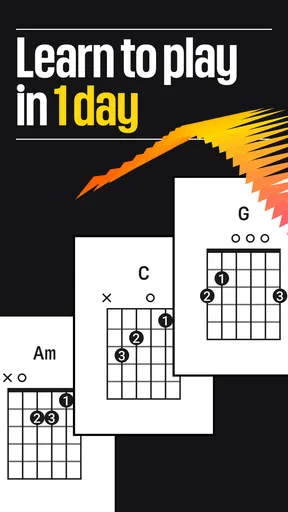
Ultimate Guitar is designed to be accessible for users at any skill level, including beginners. It includes detailed chord diagrams and tutorials to help new players learn chords and songs. The app's intuitive interface makes it easy to search for and save favorite tabs, enhancing the learning experience.
Does Ultimate Guitar support multiple instruments?
Yes, Ultimate Guitar supports not only guitar but also bass and ukulele. It offers specific tabs and chords for each instrument, along with tools like the tuner and metronome that are compatible with all supported instruments. This versatility makes it a valuable resource for multi-instrumentalists.
